Skip to content
LinkView

HMI/SCADA software

Design HMI/SCADA screens in the browser.Run them on Windows, macOS and Linux with Runtime, included with every seat.

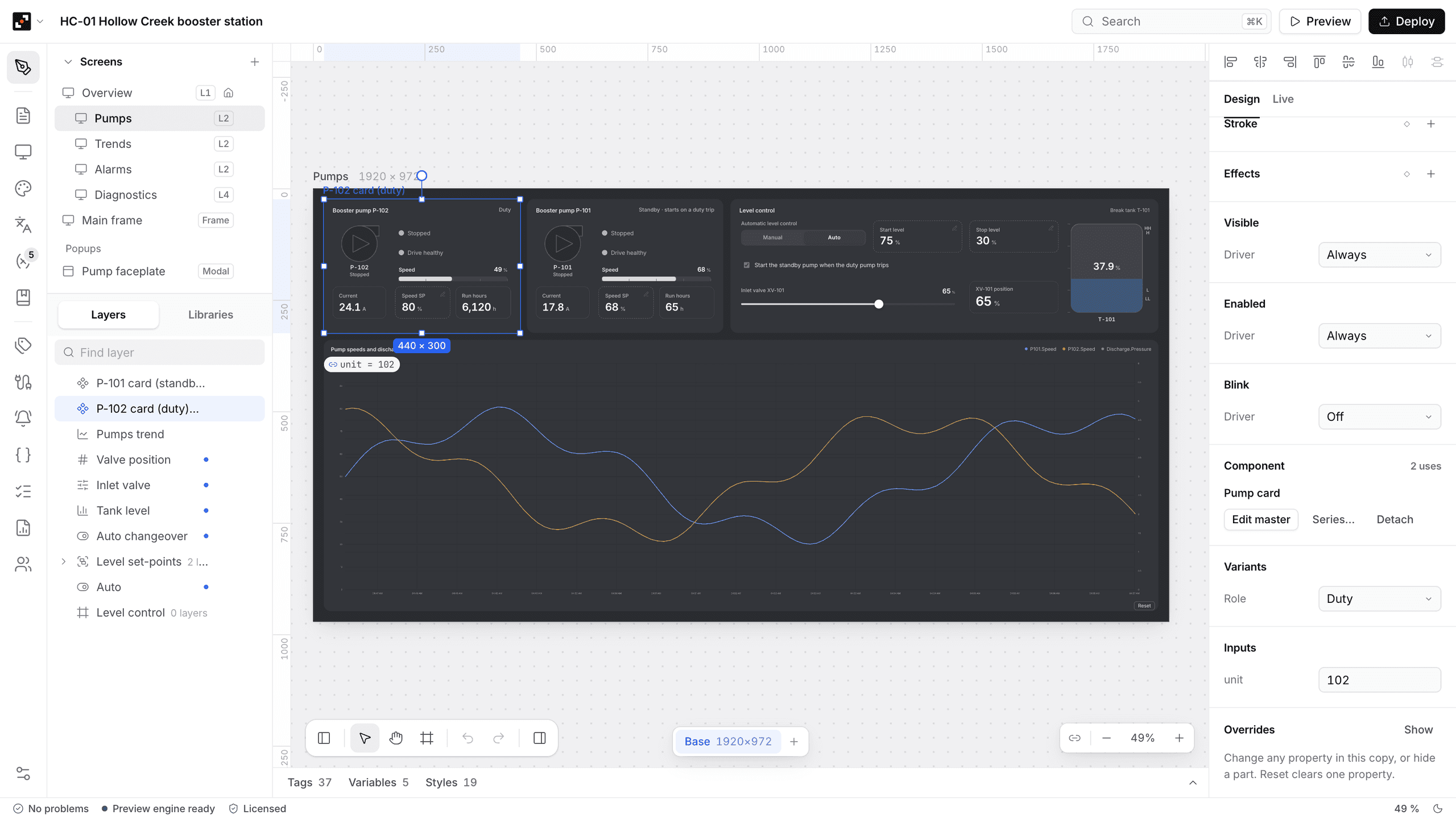
HC-01 Hollow Creek booster station overview on LinkView Runtime, running against a plant simulator: break tank T-101 at 72 %, P-101 running, P-102 stopped, no active alarms, everything grey
Widgets
42, plus groups, frames, components and hotspots
Drivers
Modbus TCP, Modbus RTU, OPC UA, MQTT and Sparkplug B
Databases
PostgreSQL, MySQL, MariaDB, SQL Server, SQLite
On the station
Alarms, trends, historian
Deploy
Signed kits, versions, last-known-good rollback
Runtime
€0 per station

Who it is for

For integrators, machine builders and plant teams.

System integrators

One seat for every client project.

  • Each client's stations run Runtime at €0 per station, so the project price carries no runtime licences.
  • Keep each project in versions with git commit ids, and download it as a git repository.
  • Let your own AI client draft screens, tags and alarms through MCP.

OEM machine builders

A panel with every machine you ship.

  • Runtime is included with the seat on any number of stations: €0 per machine you ship.
  • Publish an update to paired stations; each one installs on confirmation, automatically, or in a maintenance window.
  • Give one screen layout variants for each panel size.

Plant and utility teams

Operators see what their role allows.

  • Roles and plant areas decide which screens an operator receives and which tags they may write.
  • Sign-ins and writes go into a hash-chained audit trail.
  • When a project turns it on, operators on the LAN can use a browser.

Features

From the first screen to the running station.

Draw

Draw screens from parts.

  • Start from 42 widgets: pumps, valves, motors, VFDs, conveyors, PID faceplates, trends, alarm lists and login forms.
  • Turn a group into a component with variants, lay frames out with auto-layout, and keep colours in project tokens.
  • Bind the named parts of an SVG symbol to tags.
  • Give a screen layout variants for other panel sizes.
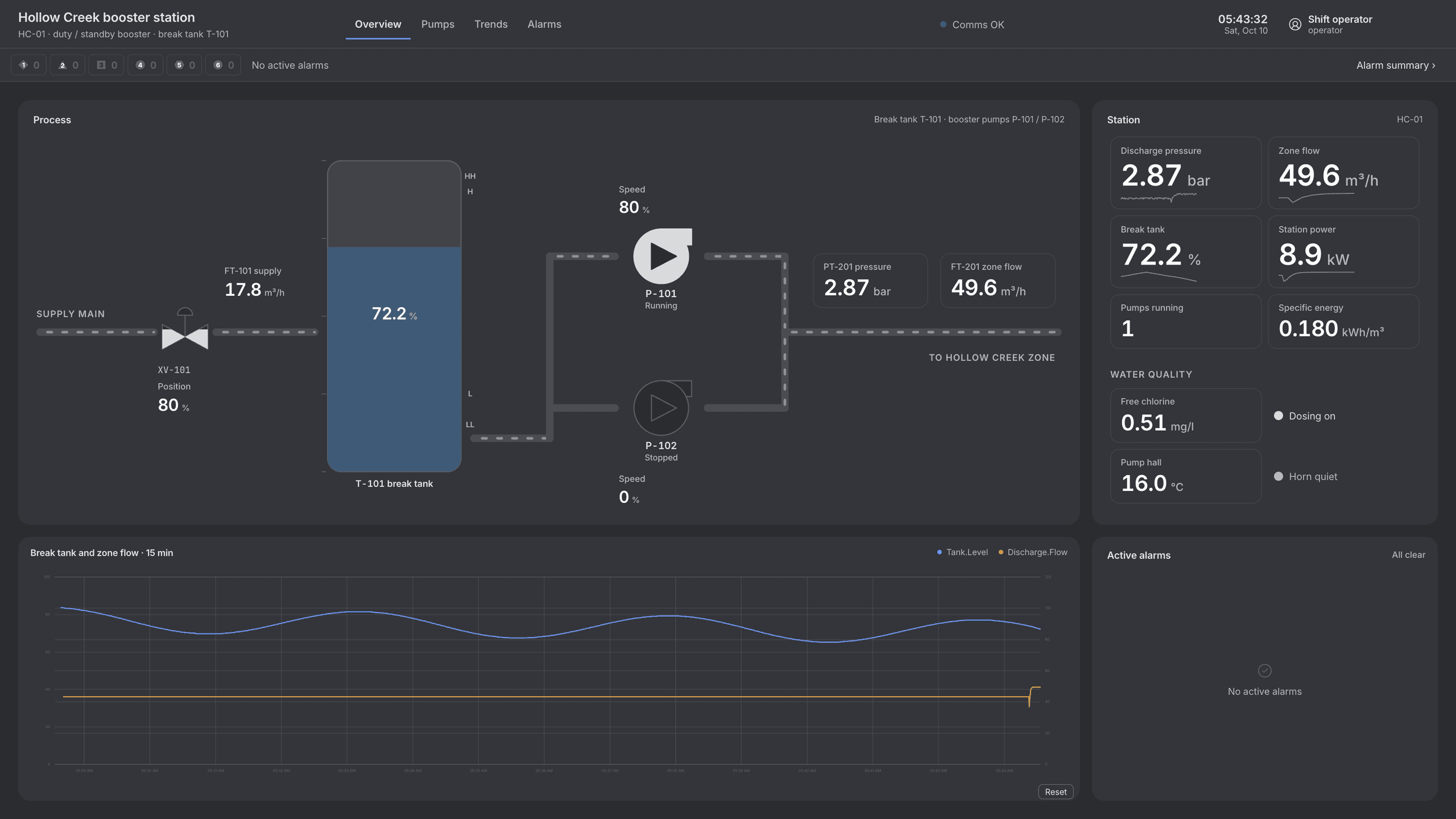
LinkView Studio Design workspace with the HC-01 Pumps screen on the canvas: the P-102 pump card, an instance of the Pump card component, is selected, with its Duty variant and unit input in the inspector and the layers list on the left
STUDIO · DESIGN · WATER-BOOSTER · 1600×900

Connect

Tags and drivers, defined once.

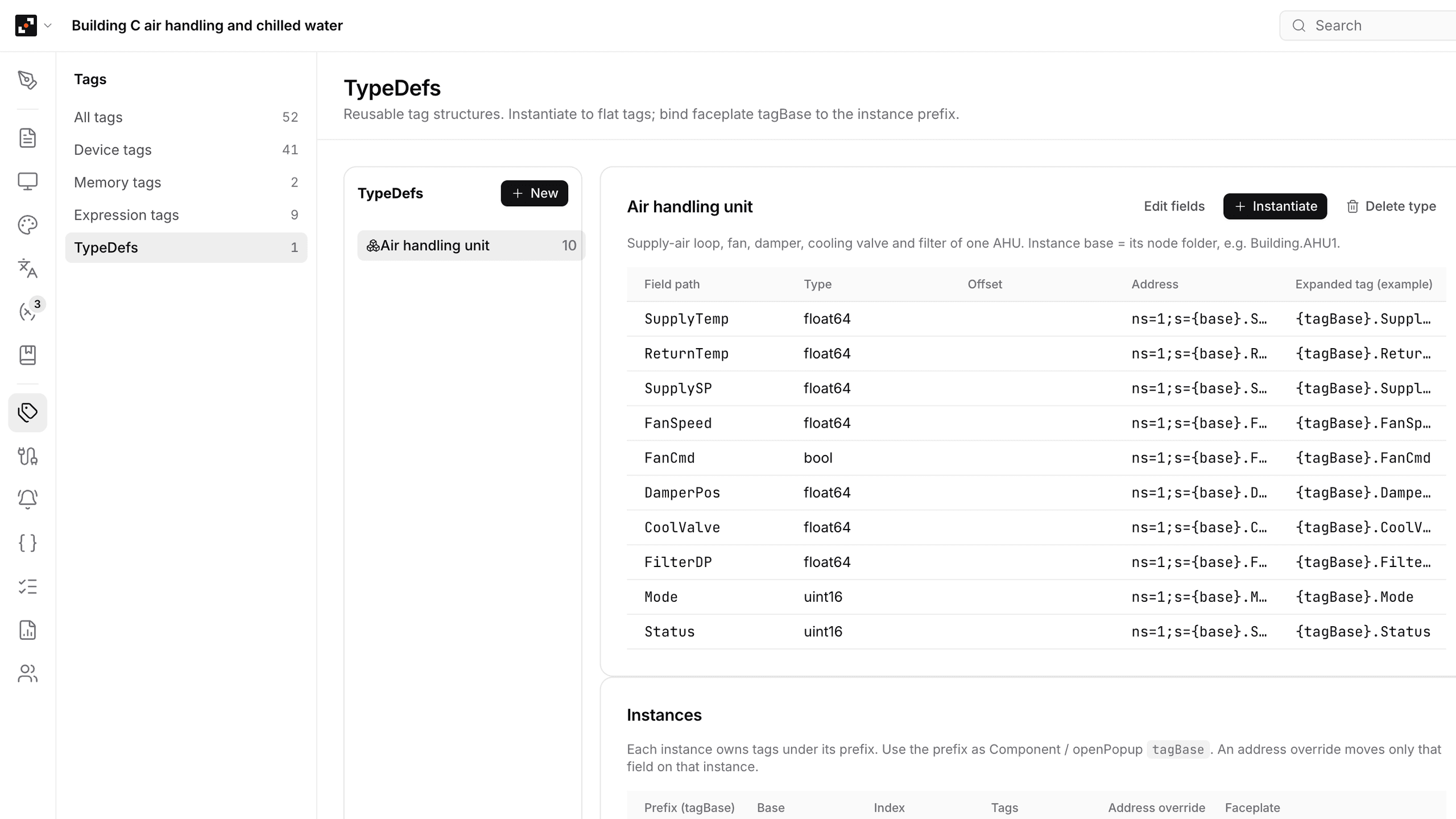
  • Define tags and reusable TypeDefs, then connect them to Modbus TCP, Modbus RTU over serial, or OPC UA.
  • Add MQTT for plain topics or Sparkplug B. One project can hold all of these connections at once.
  • A station can also connect to PostgreSQL, MySQL and MariaDB, SQL Server and SQLite.
  • Connection passwords stay out of the project file; the project keeps only a reference.
  • In the browser, Preview runs your screens against a built-in pump-station simulator and never contacts a device. Runtime is what talks to your PLCs.
LinkView Studio Tags workspace for Building C: the Air handling unit TypeDef with its ten fields (supply and return temperature, set-point, fan speed and command, damper, cooling valve, filter pressure, mode, status), their types and OPC UA addresses
STUDIO · TAGS · BUILDING-ENERGY · 1340×754

Operate

Alarms, trends and history on the station.

Alarm states
Alarms move through unacknowledged, acknowledged and returned-to-normal states.
Shelving and horn
Operators can shelve an alarm for a set time, with a reason. A tag named Horn stays true while an unacknowledged, unshelved alarm is active.
Trends
Trends plot several pens from the built-in historian, with drag-to-zoom and an optional right axis.
In the engine
Faceplates, recipes, CSV and HTML reports, and QuickJS scripts run in the same engine.
Web client
When a project turns it on, the station serves a web client for signed-in browsers on the LAN.
Databases
A station can connect to PostgreSQL, MySQL and MariaDB, SQL Server and SQLite.
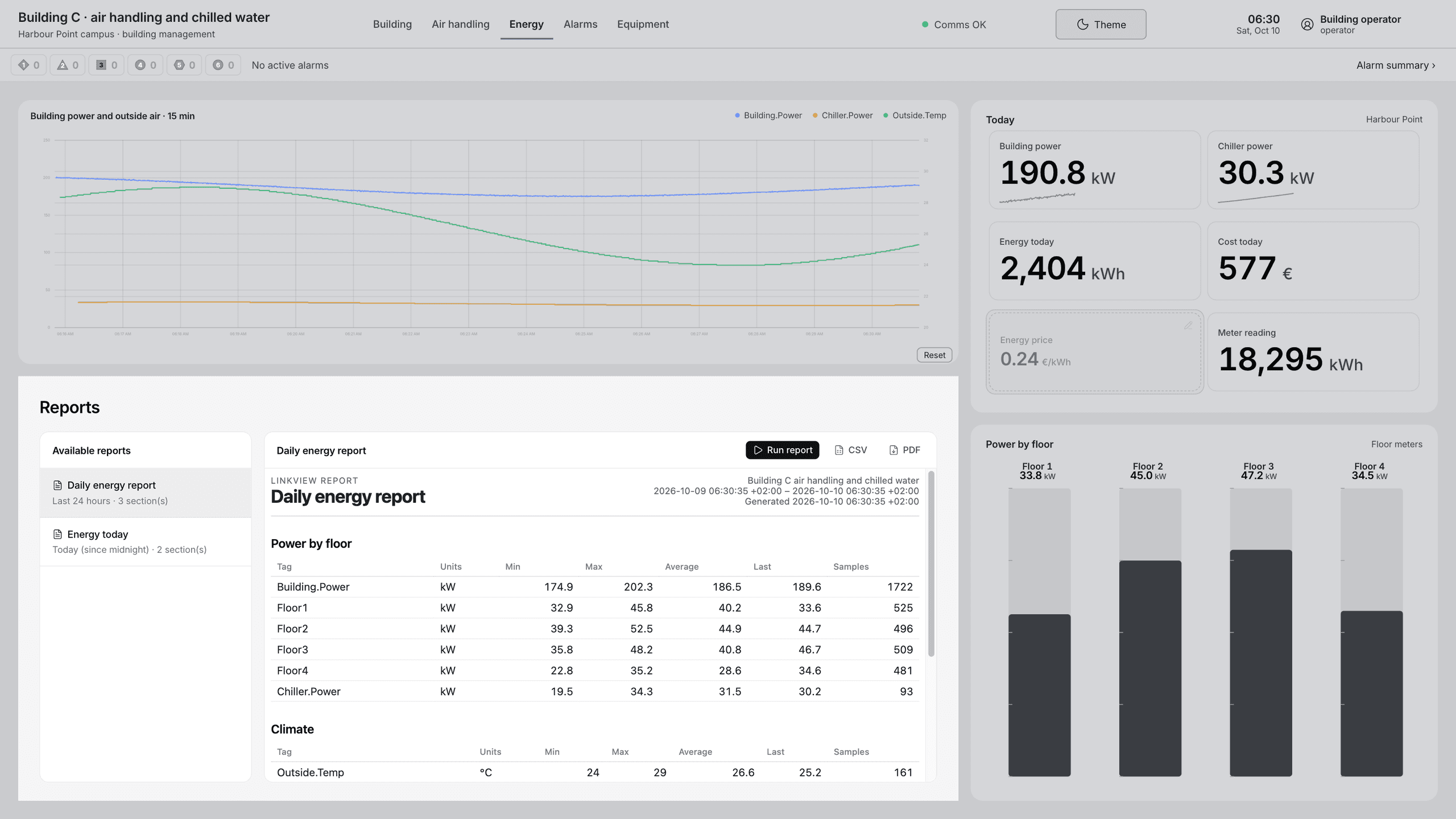
LinkView Runtime showing the Building C Energy page against its plant simulator: a 15-minute trend of building power, chiller power and outside temperature, today’s power, energy and cost, power by floor, and the Daily energy report run on the station
RUNTIME · ENERGY · BUILDING-ENERGY · 1600×900

Secure

Who can do what, and what was done.

  • Users, roles and plant areas decide which screens an operator receives and which tags they may write.
  • Operators can sign in with a PIN; five wrong PINs lock the account for 1, then 5, then 15 minutes.
  • Sign-ins and writes go into a hash-chained audit trail.
  • Critical tags ask for confirmation, and held buttons return to their safe value when released.

Deploy

Deploy a signed package. Keep the last good one.

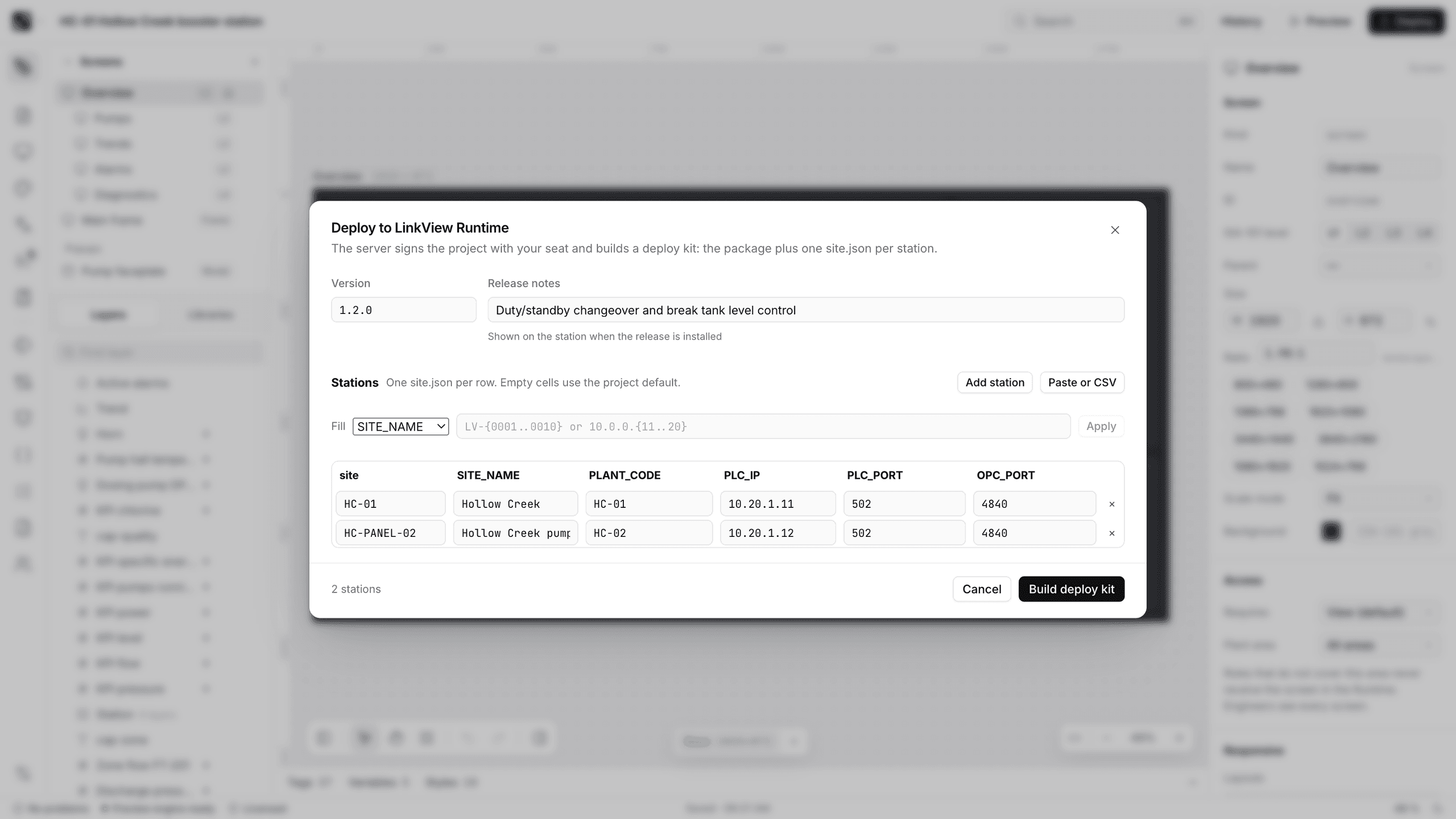
  • Studio builds a signed deploy kit on the server.
  • Copy it to the station on USB, or publish it to paired stations; each station installs on confirmation, automatically, or in a maintenance window.
  • If a new package cannot start, Runtime goes back to the last-known-good one.
  • The station database is backed up every night, and the last seven backups are kept.
LinkView Studio’s Deploy to LinkView Runtime sheet for HC-01: version, release notes and one row of site values per station, with the Build deploy kit button
STUDIO · DEPLOY · WATER-BOOSTER · 1600×900

Versions

Every version kept, compared and tagged on deploy.

  • Save a version at any point; its id is a git commit id.
  • Compare any two versions object by object, with line diffs for scripts, SQL and rules, and screen by screen.
  • Work on a branch and merge it object by object.
  • Download the project as a git repository, with every branch and milestone.

Version control for HMI projects

Team

Share a project, and know what each deploy was built from.

  • Share a project by email, to edit or to view; the person accepts after signing in with that address.
  • Offer extra seats to colleagues in Account, Billing; they accept from the email.
  • A deploy tags the version it was built from as a release milestone, and the signed package names that version.

Your own AI

Use your own AI client, through MCP.

  • LinkView does not host a model.
  • Create a token under Account, MCP, and add the endpoint below to any MCP client that can send the token as a bearer header, for example Claude, ChatGPT, Cursor, GitHub Copilot or Grok.
  • The client can edit screens, widgets, bindings, tags, alarms, scripts, recipes and reports. Edits need a seat or a running trial.

https://linkview.dev/api/mcp

How to connect an MCP client · HMI design with your own AI

Client config · JSON
{
  "mcpServers": {
    "linkview": {
      "url": "https://linkview.dev/api/mcp",
      "headers": {
        "Authorization": "Bearer lv_mcp_…"
      }
    }
  }
}

Showcase

3 projects, opened in Studio and running in Runtime.

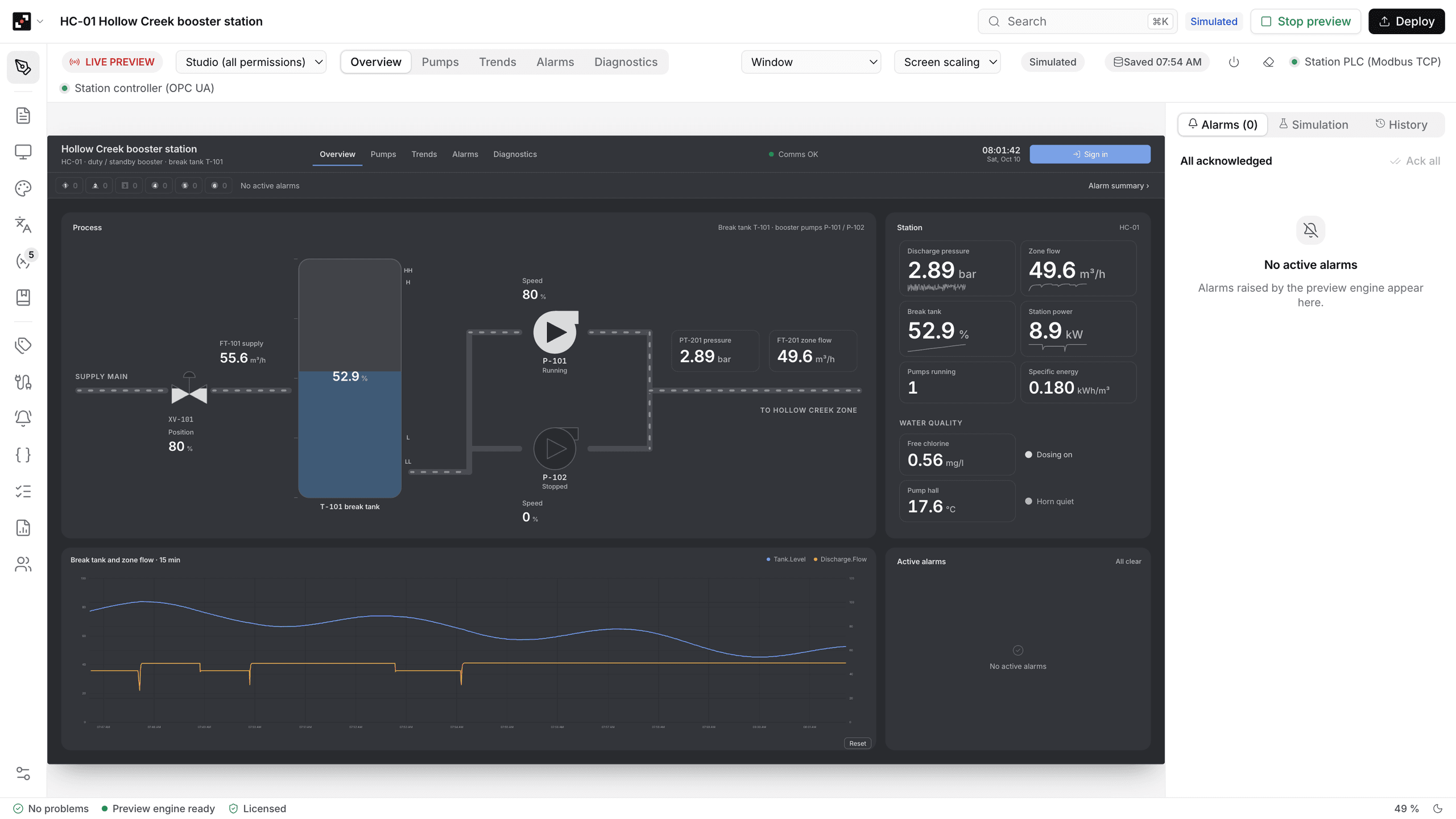
Break tank T-101 and two booster pumps (duty / standby) feeding the Hollow Creek pressure zone. Station PLC over Modbus TCP, station controller over OPC UA.

  • Modbus TCP, Modbus RTU, OPC UA
  • Alarm states
  • Trends
  • Scripts
  • Simulated Preview
HC-01 Hollow Creek overview running in LinkView Studio’s Preview with simulated values (Simulated shown): break tank T-101, P-101 running, P-102 stopped, no active alarms
STUDIO · PREVIEW · WATER-BOOSTER · 1600×900

Media

The product film.

1:15, captioned, no narration.

Pricing

One price for Studio, per seat.Runtime included with every seat.

Studio

€399.99per seat per month

or €3,999.99 per seat per year, €799.89 less than 12 months

  • Edit, preview and save projects in your browser
  • Build signed deploy kits and publish to paired stations
  • Edit through MCP with your own AI client
  • Up to 200 projects and 200 MiB of revisions and assets per account
  • Billed until you cancel; the seat ends at the end of the paid period
  • Getting-started course and training included with every paid seat

Runtime

€0included with every seat

Stations need no licence. Runtime installs only packages signed by a Studio seat.

  • Installers for Windows, macOS and Linux
  • Modbus TCP, Modbus RTU and OPC UA
  • Alarms, trends, historian, recipes and reports
  • Users, roles, areas, PIN sign-in and audit trail
  • Remote publish, last-known-good rollback and nightly backups

Buy seats.

Choose monthly or annual and the number of seats, from 1 to 100. You pay on Stripe's checkout page, in EUR.

Billing period

Seats

1 seat · monthly€399.99

Payments by Stripe. The seat is billed until you cancel; it is on your account when the first payment completes, and each invoice is emailed.

Buy the source code.

The whole LinkView codebase with a white-label licence: change it, rebrand it and sell your own products built on it. After the payment we send the code to your account email within days.

For businesses only. You may not resell or publish the source code itself. Updates and support are not included.

€19,999.99one payment

Payments by Stripe, in EUR.

Before you buy

What happens after the 3-day trial?

Your projects stay in your account and open read-only. Saving, deploying and MCP edits then need a seat. The trial starts the first time you open Studio, once per account.

Can I try it against my own PLC first?

Not from the browser: Preview uses the built-in simulator. Real devices are reached by a Runtime running a deployed package, and deploying needs a seat.

What does a seat cover?

One person editing and deploying, signed in on one browser at a time. The account that buys gets the first seat. Offer the others to colleagues in Account, Billing; they accept from the email.

If we cancel, do our stations stop?

No. Packages already deployed keep running. Edits and new deploys stop at the end of the paid period.

Can we get a refund?

No. Access starts as soon as you pay, and payments are final. Try Studio first in the 3-day trial. If you cancel, the seat runs to the end of the paid period.

Does Runtime need a licence or internet access?

No licence. Runtime runs a signed package on the station. It goes online only if you pair the station for remote publishing or let it check for updates.

Which systems does Runtime run on?

Windows, macOS and Linux. The installers are listed under Download.

How do we pay?

Through Stripe's checkout, in EUR: seats monthly or yearly, the source code in one payment.

Do you offer integrator or OEM terms?

Write to us below and tell us about the project.

All questions

Download

Download Runtime.

Included with every seat. Released 2026-10-11.

Windows
x64
Installer (.exe)linkview-runtime-setup-1.1.0-x64.exe
118.3 MB
SHA-512 7d425a046df4…
Windows
arm64
Installer (.exe)linkview-runtime-setup-1.1.0-arm64.exe
112.9 MB
SHA-512 29b730cb967d…
macOS
Apple silicon and Intel
Disk image (.dmg)linkview-runtime-1.1.0-universal.dmg
227.6 MB
SHA-512 1db1f6979ede…
Linux
x64
AppImagelinkview-runtime-1.1.0-x86_64.AppImage
136.3 MB
SHA-512 b40e5477bdaf…
Linux
x64
Debian package (.deb)linkview-runtime_1.1.0_amd64.deb
107.1 MB
SHA-512 1652f24e1136…
Linux
arm64
AppImagelinkview-runtime-1.1.0-arm64.AppImage
137.5 MB
SHA-512 a705b88174fa…
Linux
arm64
Debian package (.deb)linkview-runtime_1.1.0_arm64.deb
102.2 MB
SHA-512 dbf360d6fbcc…
  • The macOS app is signed with a Developer ID and notarised by Apple.
  • Make the AppImage executable (chmod +x) and run it.

Check a download: shasum -a 512 <file> on macOS and Linux, Get-FileHash -Algorithm SHA512 <file> in PowerShell.

Studio has nothing to install. It runs in your browser.

Custom work

We can build what LinkView does not have.

For example a driver for another protocol, a widget for your equipment, an integration with your other systems, or the screens themselves. Tell us what the project needs.

Contact

Contact.

Questions about a project, custom work, OEM or integrator terms, or a problem. The form emails your message to us, and we reply to the address you give.

How we handle it: privacy notice.